How do I stop people farming the free credits in my AI app? Check each signup with a Supabase hook before the account exists. Refuse burner addresses there, and repeat signups from one Gmail inbox after a few tries, so those accounts never get credits.
- Clone the app and install its packages.
- Sign up for signupbouncer and copy your hook URL and secret into
supabase/.env. - Start Supabase and the app, then spend a credit on the sample image.
- Watch the hook in shadow mode, then switch your app to Enforce.
- Enter your cost per free account, so the dashboard shows the credits saved.
- Deploy to a hosted Supabase project and any host that runs Next.js.
Free credits let people try an AI app before they pay. They also pay for scripts that open account after account and use up the credits on each one.
In October 2025 Soniox stopped giving free credits to new signups, after what its post calls "mass signups using fake or duplicate Gmail accounts". The Hacker News thread The AI Credit Resale Economy covers the market where credits like these are sold on.
This guide builds a small image generator on Next.js, Supabase and Replicate. Each new account gets 10 free credits, and each image costs one. A Supabase Before User Created hook sends every signup to signupbouncer before Supabase creates the user.
You run it in shadow mode first, then switch it on. From then on, we refuse burner addresses, domains that can't receive mail and repeat signups from one Gmail inbox after a few tries. They never get a user and never get credits.
The finished code is in signupbouncer/nextjs-supabase-ai-image-credits, under the MIT license.
What a farmed account costs
The app makes images with FLUX schnell on Replicate. Replicate's pricing page lists it at $3.00 per thousand images (read on 15 Oct 2026). So one image costs $0.003, and 10 free credits cost you $0.03 an account.
A farm of 1,000 accounts costs $30 every time its script runs, and the script can run again the next day.
Those figures grow with the model. The same 10 credits on a model at $0.03 an image cost $0.30 an account and $300 for the same farm. Keep your own number in mind, because you enter it in the dashboard near the end of this guide.
Get the code
You need Node 22.18 or later, Docker (or another container runtime the Supabase CLI supports) and the Supabase CLI. Supabase's CLI guide lists the ways to install the CLI:
- macOS and Linux, with Homebrew:
brew install supabase/tap/supabase - Windows, with Scoop: the two commands in that guide
- Any system, inside the project:
npm install supabase --save-dev, then typenpx supabasewherever this guide sayssupabase
Clone the repo and install its packages:
git clone https://github.com/signupbouncer/nextjs-supabase-ai-image-credits
cd nextjs-supabase-ai-image-credits
npm install
Connect signupbouncer
Sign up for signupbouncer. On the Free plan you get 1,000 checks a month, with no card. Your account starts with one app.
Open its Integration tab and copy the Hook URL and the Hook secret. The hook needs no API key.
For local Supabase, copy supabase/.env.example to supabase/.env and paste both values into it. supabase start
reads them from that file. It stops with a config error while they're missing.
# Local Supabase only: `supabase start` reads this file (copy it to supabase/.env) and fills the
# [auth.hook.before_user_created] block in config.toml. On hosted Supabase you paste the same two values in the
# dashboard instead: Authentication > Hooks > Before User Created > HTTPS.
SIGNUPBOUNCER_HOOK_URL=https://signupbouncer.com/hook/supabase/app_...
SIGNUPBOUNCER_HOOK_SECRET=v1,whsec_...
supabase/.env is in .gitignore, so the secret stays out of your commits.
Every signupbouncer app starts in shadow mode. We check and log each signup and refuse none, so the app works as usual while you try it. A burner address still gets an account and credits until you switch to Enforce near the end of this guide.
Start it
Start Supabase. It applies the migration on the way up:
supabase start
The CLI publishes the local database (port 54322) and API (port 54321) on every network interface. On a shared or
public network, block those ports in your firewall, and run supabase stop when you finish.
Copy the app's env file:
cp .env.example .env.local
supabase status prints your local project's URL and keys (supabase start printed them too). Copy three of them
into .env.local:
- Project URL,
http://127.0.0.1:54321, goes inNEXT_PUBLIC_SUPABASE_URL. - The key labelled Publishable, which starts with
sb_publishable_, goes inNEXT_PUBLIC_SUPABASE_PUBLISHABLE_KEY. - The key labelled Secret, which starts with
sb_secret_, goes inSUPABASE_SECRET_KEY.
Leave REPLICATE_API_TOKEN empty to use the sample image. Then start the app:
npm run dev
Open http://127.0.0.1:3000, the site URL in supabase/config.toml. next.config.ts sets
allowedDevOrigins: ["127.0.0.1"]. Without it, Next.js 16 serves its dev scripts only to localhost, and the pages
would never load their JavaScript.
Create an account with an address at gmail.com. Local Supabase skips email confirmation, so you land on the home page signed in, with 10 credits.
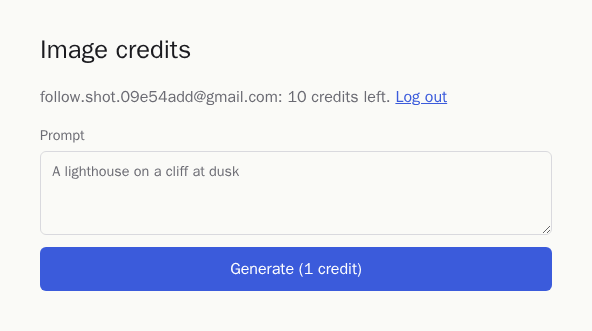
Choose Generate. The sample image appears and the counter drops to 9.
The credits table
The migration in supabase/migrations/ gives each user one row with their balance:
-- One row per user: how many image credits they have left.
create table public.credits (
  user_id uuid primary key references auth.users on delete cascade,
  balance integer not null check (balance >= 0)
);

alter table public.credits enable row level security;

-- A signed-in user can read their own balance and nothing else. There is no insert, update or delete policy, so
-- users cannot change balances; only the functions below can.
create policy "read own credits" on public.credits
  for select to authenticated
  using ((select auth.uid()) = user_id);
The check (balance >= 0) constraint keeps a balance from going below zero, whatever code runs against it. Row-level
security is on, and the one policy lets a signed-in user read their own row.
With no insert, update or delete policy, a user who holds the publishable key in the browser can read their balance and change nothing.
New users get their credits from a trigger on auth.users, the table where Supabase Auth keeps users:
-- Every new user starts with 10 free credits. A signup the hook refuses never reaches auth.users, so it gets none.
create function public.give_free_credits()
returns trigger
language plpgsql
security definer set search_path = ''
as $$
begin
  insert into public.credits (user_id, balance) values (new.id, 10);
  return new;
end;
$$;

create trigger give_free_credits
  after insert on auth.users
  for each row execute function public.give_free_credits();
The function is security definer, so the insert runs with the rights of the function's owner. Supabase Auth's own
database role then needs no access to public.credits. set search_path = '' makes Postgres read every table name
exactly as written, with its schema.
The trigger is the reason the signup check has to run before the user exists. The moment Supabase inserts a user, the credits are there. A check that ran after signup would race the trigger, and you'd have to claw credits back.
When the hook refuses a signup, it never reaches auth.users, so the trigger never fires for it.
Spending a credit
These functions take a credit and give one back:
-- Takes one credit from the signed-in user in a single statement and returns the new balance, or null when the
-- balance is already 0. Two requests racing for the last credit cannot both win: the second one waits for the
-- first's row lock, then sees balance 0 and updates nothing.
create function public.spend_credit()
returns integer
language sql
security definer set search_path = ''
as $$
  update public.credits
  set balance = balance - 1
  where user_id = (select auth.uid()) and balance > 0
  returning balance;
$$;

-- Gives one credit back after a failed generation. Only the server (secret key) may call it; if users could, they
-- would mint their own credits from the browser.
create function public.refund_credit(p_user_id uuid)
returns integer
language sql
security definer set search_path = ''
as $$
  update public.credits
  set balance = balance + 1
  where user_id = p_user_id
  returning balance;
$$;

revoke execute on function public.spend_credit() from public, anon;
grant execute on function public.spend_credit() to authenticated;
revoke execute on function public.refund_credit(uuid) from public, anon, authenticated;
grant execute on function public.refund_credit(uuid) to service_role;
spend_credit() is one update statement with balance > 0 in its where clause. When two requests race for the
last credit, the second waits for the first's row lock. It then finds a balance of 0, updates no row and returns null.
The repo's database tests run two spends of the last credit at the same time and get one success and one null.
refund_credit() takes a user id, so a caller could pass any user's id. That makes it a server-only function.
By default, the anon role can run every new function in the public schema. The revoke lines at the end take
that away, so only service_role (your secret key) can call refund_credit(). If signed-in users could call it, any
of them could add credits to their own balance with supabase.rpc("refund_credit") from the browser console.
The route handler in app/api/generate/route.ts uses them:
export async function POST(request: Request) {
  const supabase = await createClient();
  const { data: { user } } = await supabase.auth.getUser();
  if (!user) return Response.json({ error: "Sign in first." }, { status: 401 });

  // Anything but a JSON object with a string prompt gets a 400, including a body of null.
  const body: unknown = await request.json().catch(() => null);
  const prompt = typeof body === "object" && body !== null && "prompt" in body ? body.prompt : undefined;
  if (typeof prompt !== "string" || !prompt.trim() || prompt.length > 500) {
    return Response.json({ error: "Write a prompt of up to 500 characters." }, { status: 400 });
  }

  // Take one credit before calling the model. null means the balance was already 0.
  const { data: credits, error } = await supabase.rpc("spend_credit");
  if (error) return Response.json({ error: "Could not read your credits." }, { status: 500 });
  if (credits === null) {
    return Response.json({ error: "You are out of credits.", credits: 0 }, { status: 402 });
  }

  try {
    const image = await generateImage(prompt.trim());
    return Response.json({ image, credits });
  } catch (err) {
    // The model failed, so the user gets the credit back.
    console.error("generate:", err);
    const refunded = await refundCredit(user.id);
    if (refunded === null) {
      return Response.json(
        { error: "Image generation failed. We could not give your credit back.", credits },
        { status: 502 },
      );
    }
    return Response.json(
      { error: "Image generation failed. Your credit was returned.", credits: refunded },
      { status: 502 },
    );
  }
}

// Gives one credit back with the secret key and returns the new balance, or null if the refund failed. A failed
// refund is logged and never retried: if the first call did reach the database, a retry would return two credits.
async function refundCredit(userId: string): Promise<number | null> {
  try {
    const { data, error } = await createAdminClient().rpc("refund_credit", { p_user_id: userId });
    if (error || typeof data !== "number") {
      console.error("refund failed:", userId, error?.message ?? "no balance returned");
      return null;
    }
    return data;
  } catch (err) {
    console.error("refund failed:", userId, err);
    return null;
  }
}
The route takes the credit before it calls the model. Two quick clicks on the last credit then give one image and one "You are out of credits." answer with status 402, instead of two images.
If the model call throws, the route gives the credit back with createAdminClient() from lib/supabase/server.ts.
That client uses SUPABASE_SECRET_KEY, which has no NEXT_PUBLIC_ prefix, so Next.js never sends it to the browser.
If the refund fails too, refundCredit() logs the user's id, and the route tells the user it couldn't give the credit
back. The route doesn't try the refund again. A refund can reach the database and still report an error, and a second
try would then give two credits back.
Look for refund failed: in your logs and fix those balances by hand.
The model call itself:
import Replicate, { type FileOutput } from "replicate";

export const SAMPLE_IMAGE = "/sample.svg";

// One FLUX schnell image on Replicate ($0.003 each). Without REPLICATE_API_TOKEN the app returns a bundled sample
// image instead, so you can try the credit flow without a Replicate account.
export async function generateImage(prompt: string): Promise<string> {
  if (!process.env.REPLICATE_API_TOKEN) return SAMPLE_IMAGE;

  const replicate = new Replicate({ auth: process.env.REPLICATE_API_TOKEN });
  const [image] = (await replicate.run("black-forest-labs/flux-schnell", {
    input: { prompt, num_outputs: 1, output_format: "webp" },
  })) as FileOutput[];
  return image.url().href;
}
With no REPLICATE_API_TOKEN set, generateImage() returns the bundled public/sample.svg, and the route still
spends the credit. You can try the whole credit flow without a Replicate account, and add a token when you want real
images.
The sign-up page
The form lives in app/signup/page.tsx:
export default function SignUpPage() {
  const router = useRouter();
  const [error, setError] = useState<string | null>(null);
  const [pending, setPending] = useState(false);

  async function onSubmit(event: React.FormEvent<HTMLFormElement>) {
    event.preventDefault();
    setPending(true);
    setError(null);
    const form = new FormData(event.currentTarget);

    // Called from the browser, so the signup check sees the user's IP address, not your server's.
    const { error } = await createClient().auth.signUp({
      email: String(form.get("email")),
      password: String(form.get("password")),
    });

    setPending(false);
    if (error) {
      // A refused signup lands here with the message set in signupbouncer.
      setError(error.message);
      return;
    }
    router.push("/");
  }

  return (
    <>
      <h1>Create an account</h1>
      <p className="muted">New accounts get 10 free image credits.</p>
      <form method="post" onSubmit={onSubmit}>
        <label>
          Email
          <input name="email" type="email" required autoComplete="email" />
        </label>
        <label>
          Password
          <input name="password" type="password" required minLength={8} autoComplete="new-password" />
        </label>
        {error && <p className="error" role="alert">{error}</p>}
        <button type="submit" disabled={pending}>{pending ? "Creating account..." : "Sign up"}</button>
      </form>
      <p className="muted">Already have an account? <a href="/login">Log in</a></p>
    </>
  );
}
signUp() runs in the browser on purpose. The hook gets the IP address of whoever called Supabase Auth, and on paid
plans we score that address.
Called from the browser, that's the address of the person signing up. Called from a server action, it would be your server's address for every signup.
When we refuse a signup, signUp() returns an error whose message is the block message you set in signupbouncer.
The form shows it under the fields. The page has no signupbouncer code in it.
The form has method="post". If someone clicks Sign up before React has loaded, the browser submits the form itself.
With a POST, the password stays out of the URL.
How farmers drain free credits
A farm needs many accounts that each look new to Supabase, and it needs them cheap.
Burner domains. Sites like mailinator.com hand out an inbox to anyone who types a name, and there are thousands of
such domains. A farm signs up k7w2q@mailinator.com, opens the inbox if it needs a confirmation link, and moves on.
One Gmail inbox, many spellings. Gmail ignores dots and everything after a +, so these addresses all deliver to
one inbox:
jane.doe@gmail.com
janedoe+1@gmail.com
j.a.n.e.doe+img2@gmail.com
Supabase stores each spelling as a different user, and each one gets 10 credits.
Scripts on cloud servers. A script that creates accounts usually runs on a rented server. Its signups come from a hosting network's IP addresses, often many in a short time.
In your users table it looks like this:
k7w2q@mailinator.com
x8p1d@sharklasers.com
jane.doe+1@gmail.com
jane.doe+2@gmail.com
j.anedoe@gmail.com
Email confirmation slows none of these down. A burner inbox receives the confirmation link, and so does the Gmail inbox behind every spelling.
How the hook checks a signup
The CLI fills in this block of supabase/config.toml from supabase/.env:
# signupbouncer checks every new signup before Supabase creates the user.
# Copy the hook URL and secret from the signupbouncer dashboard (Integration tab) into .env.
[auth.hook.before_user_created]
enabled = true
uri = "env(SIGNUPBOUNCER_HOOK_URL)"
secrets = "env(SIGNUPBOUNCER_HOOK_SECRET)"
On a hosted Supabase project, you paste the same two values in the dashboard. Open Authentication, then Hooks, and add a hook. Pick "Before User Created" and the HTTPS type, paste the hook URL and the hook secret, and save.
Either way, your app's code stays as it is.
From then on, Supabase sends every signup to the hook before it creates the user. To refuse one, we answer with HTTP 200 and an error object that carries your message. Supabase Auth returns that message to your app as a sign-up error with status 400.
In our test run against Supabase Auth v2.197.0, the form showed the message word for word.
If our server is slow or down, the signup goes through unchecked. We answer allow when a check takes longer than 1.2 seconds. The hook URL runs through a Cloudflare Worker, which answers allow when our server takes longer than 1.5 seconds, sends an error or can't be reached.
The Worker runs on Cloudflare. A Cloudflare incident, or the Worker going over one of Cloudflare's limits, makes the hook call itself fail, and the signup then fails with an error from Supabase. If that happens, switch the hook off under Authentication, then Hooks, and signups go through unchecked until you switch it back on.
If the secret in Supabase doesn't match yours, the signup also goes through unchecked. The Integration tab shows how many hook calls had a bad signature.
Shadow mode first
Your app is still in shadow mode, so we check and log each signup and let it through. Log out, then create an account with an address at mailinator.com. It goes through, and the account gets 10 credits.
Open the Checks tab on your signupbouncer dashboard. The mailinator.com signup is marked block with the reason
disposable_domain, and the Overview tab counts it under "Would have been blocked". Test signups count toward your
monthly checks.
In production, leave the app in shadow mode for about a week. Real signups come in, and the Checks tab lists each one with its result and reasons. Look for blocks on addresses you know belong to real customers.
If you find one, add an always-allow override for that email or domain on the Rules tab. The reason codes table explains each reason and its points.
On the Free plan, a check also lists "Paid plans would add" with the IP and velocity reasons that fired. Those add no points to the score on the Free plan. They show what a paid plan would have counted for that signup.
Switch to enforce
When the results look right, open the Rules tab, choose Enforce under Mode and choose Save settings. Log out and create an account with another mailinator.com address.
The form shows "Please sign up with a permanent email address." Supabase creates no user, and the trigger gives no credits.
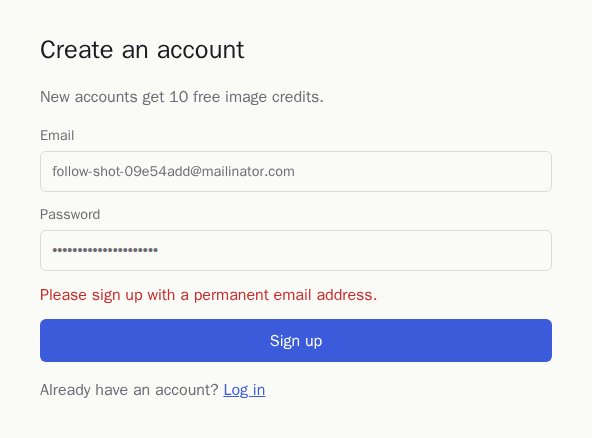
To show other words, change "Message a blocked user sees" on the Rules tab. It takes up to 200 characters.
Some signups get a challenge instead of a block. A challenge is a score between your two cutoffs, 40 and 70 by default. Repeat signups from one inbox are one source of challenges.
On every plan, we fold Gmail dots and +tags into one inbox. Then we count that inbox's signups to your account in
the last 7 days, across all your apps. The second signup adds 25 points, the third 40, the fourth 55, the fifth 70, and
the sixth or later 75.
Supabase's hook has no way to show a captcha, so a challenge is either allowed or refused. On the Rules tab, the Supabase hook's setting for challenges defaults to "Allow and log". So the third and fourth signups from one inbox get accounts, and the fifth is refused.
Choose "Treat as block" and the third is refused too. That also refuses other borderline signups, such as an address
on a free subdomain like ann@foo.duckdns.org, which scores 45 on its own.
If farmed accounts already cost you money, treat challenges as blocks and watch the Checks tab for real people it refuses.
What the credits saved figure shows
Open the Rules tab, find "Cost per free account", choose Custom and enter what one fully used free account costs you.
In this app that's 10 credits at $0.003, so 0.03. Choose Save cost.
The Overview tab then shows "Credits saved" as "up to" an amount, with its formula, blocked signups times your cost per free account. It says "up to" because a blocked account might not have used every credit.
While the app is in shadow mode, the same panel counts the signups marked block that went through, and what blocking them would have saved. That number is the case for switching to enforce.
IP checks and velocity rules on paid plans
On the Starter plan, we add points for datacenter, VPN and Tor addresses. In this app, that's the script on a rented server.
A datacenter address adds points to a signup, so a repeat signup from a cloud server reaches a challenge or a block sooner. A VPN or Tor address on its own never reaches a block, because many real people use them.
On the Pro plan, velocity rules add points for bursts of signups from one network, for one inbox in several spellings, and for many addresses that share one name-and-number pattern. Velocity points can lift a signup to a challenge and never to a block.
The hook also lets through any challenge that velocity points helped make, even with "Treat as block" chosen. That's because a class or an office behind one network produces the same bursts. Velocity rules mark signups for you to review on the Checks tab, and refuse nothing in the hook by themselves.
What the check doesn't catch
- A person with several real inboxes at different providers, say a Gmail and an Outlook address, gets an account with each. We can't link two unrelated inboxes to one person, so each address starts its own repeat count. We still score each signup on its own address and network, so from the Starter plan a datacenter, VPN or Tor address gets points whichever inbox it uses.
- Signups through residential proxies, the home IP addresses that proxy sellers rent out, look like ordinary visitors. We don't detect them.
- The check doesn't prove that the person owns the address. Supabase's email confirmation does that. It's on by default in hosted projects and off in this repo's local config.
- We check OAuth signups (Google, GitHub) on IP and signup bursts only, since the provider has verified the address. Both of those count toward the score only on paid plans.
- On the Free plan, signups past 1,000 checks in a month go through unchecked until the month ends.
Deploy it
Create a project on Supabase, then link this folder to it and push the migration:
supabase link --project-ref <your-project-ref>
supabase db push
The CLI still reads supabase/.env for these commands, so keep that file in place.
In the project's dashboard, add the hook under Authentication, then Hooks, as in the section on how the hook checks a signup. Set the Site URL under Authentication, then URL Configuration, to your app's address.
Deploy the app to Vercel or any host that runs Next.js, with these environment variables from your project's API
settings: NEXT_PUBLIC_SUPABASE_URL, NEXT_PUBLIC_SUPABASE_PUBLISHABLE_KEY and SUPABASE_SECRET_KEY. Add
REPLICATE_API_TOKEN for real images.
On a hosted project, Supabase's email confirmation is on by default. After signing up, a user opens the link in the
confirmation email, then logs in at /login. Until then the home page shows them as signed out.
Where to go next
- signupbouncer/nextjs-supabase-ai-image-credits has the finished code and its tests.
- Install in Supabase covers what happens when the hook fails, and which signups the hook sees.
- The reason codes table shows what each reason means and how the points add up.
- Shadow and enforce shows what each mode does with a check's result.
- Pricing lists what the Starter plan and the Pro plan include.