How do I stop burner and repeat signups in the Next.js SaaS starter? Add one signupbouncer check to signUp, the
server action that creates the user, before it hashes the password.
- Run the starter locally, with Postgres in Docker and a
.envyou write by hand. - Create a signupbouncer key and copy the helper into
lib/signupbouncer.ts. - Call
checkSignupinsignUp, before it hashes the password. - In production, set the header that holds the client IP.
- Watch shadow mode on the dashboard, then switch your app to Enforce.
- Lowercase the email in the starter's schemas, so
Test@test.comandtest@test.comare one account.
The Next.js SaaS starter creates an account and a team for any address
someone types into its signup form. It sends no confirmation email, so x@mailinator.com gets an account. So does an
address at a domain that can't receive mail.
One person with one Gmail inbox can also open account after account by moving a dot or adding a +tag. Every team
the starter creates can start the 14-day trial it sets at Stripe Checkout.
With the check in place, your form refuses a burner (disposable) address or a domain that can't receive mail, with a message in the form you already have. It refuses repeat signups from one Gmail inbox after a few tries.
The finished code is in
signupbouncer/nextjs-saas-starter-signup-protection.
It's built from the starter at commit 6e33e58 (11 Dec 2025) and kept under its MIT license.
Get the starter running
If the starter already runs on your machine, skip to the next section. Otherwise, clone it and install its packages:
git clone https://github.com/nextjs/saas-starter
cd saas-starter
pnpm install
The starter's pnpm db:setup script needs Docker and the Stripe CLI, and it writes .env for you. The check doesn't
need Stripe, so you can write .env by hand. Start Postgres on the port that script uses:
docker run -d --name saas-starter-db -p 127.0.0.1:54322:5432 -e POSTGRES_PASSWORD=postgres postgres:16.4-alpine
The 127.0.0.1: part publishes the database on your own machine only. Without it, Docker opens port 54322 on every
network interface. Anyone on your network could then log in with the password postgres.
Then create .env:
POSTGRES_URL=postgres://postgres:postgres@127.0.0.1:54322/postgres
STRIPE_SECRET_KEY=sk_test_placeholder
STRIPE_WEBHOOK_SECRET=whsec_placeholder
BASE_URL=http://localhost:3000
AUTH_SECRET=replace-with-a-long-random-string
Any long random string works for AUTH_SECRET, such as the output of openssl rand -base64 32. Signup works with the
placeholder Stripe values.
The pricing page, Checkout and pnpm build call Stripe, so they need your Stripe test keys. The starter's README has
that setup.
Create the tables, then start the app:
pnpm db:migrate
pnpm dev
Skip pnpm db:seed, because it creates products in your Stripe account.
The starter pins a Next.js 15.6 canary. On the first pnpm dev, it rewrites a few lines of tsconfig.json, so
git status shows that file as changed.
pnpm dev also prints a warning that middleware is deprecated. The warning comes from the upstream starter, and
signup works with it.
Get a signupbouncer key
Sign up for signupbouncer. On the Free plan you get 1,000 checks a month, and you don't need a card.
On your app's Integration tab, choose "Create API key". We show the key (sb_live_...) only once, so copy it then.
Add the helper
The helper is one file, lib/signupbouncer.ts, with no dependencies. Copy it into the same path in your app:
curl -o lib/signupbouncer.ts https://raw.githubusercontent.com/signupbouncer/nextjs-saas-starter-signup-protection/master/lib/signupbouncer.ts
Add these lines to .env.example. Then add the same lines to .env, and in .env replace sb_live_*** with the key
you copied:
# signupbouncer: your sb_live_... key. Server only, never NEXT_PUBLIC_.
SIGNUPBOUNCER_API_KEY=sb_live_***
# The header your host overwrites with the client IP. On Vercel: x-real-ip.
# Leave it unset and the email is checked alone.
# SIGNUPBOUNCER_IP_HEADER=x-real-ip
# Only for a local signupbouncer API. Leave unset in production.
# SIGNUPBOUNCER_BASE_URL=http://127.0.0.1:8080
The key has no NEXT_PUBLIC_ prefix, so it stays on the server. Leave SIGNUPBOUNCER_BASE_URL unset. It's for our own
tests against a local copy of signupbouncer.
Call it in signUp
Open app/(login)/actions.ts. Replace the line that imports cookies from next/headers with these:
import { cookies, headers } from 'next/headers';
import {
  checkSignup,
  clientIp,
  DEFAULT_BLOCK_MESSAGE,
  shouldBlock
} from '@/lib/signupbouncer';
In signUp, find the existingUser check and the hashPassword line after it. Add the check between them. The
existingUser check at the top of this code and the hashPassword line at the bottom are already in your file:
  if (existingUser.length > 0) {
    return {
      error: 'Failed to create user. Please try again.',
      email,
      password
    };
  }

  // Refuse burner, unreachable and repeat sign-ups before the user exists.
  // If signupbouncer is slow or down, the sign-up goes through.
  const h = await headers();
  const check = await checkSignup(
    {
      apiKey: process.env.SIGNUPBOUNCER_API_KEY ?? '',
      baseUrl: process.env.SIGNUPBOUNCER_BASE_URL || undefined,
      onError: (e) => console.warn('signupbouncer:', e.reason, e.status ?? '')
    },
    {
      email,
      ip: clientIp(h, process.env.SIGNUPBOUNCER_IP_HEADER),
      userAgent: h.get('user-agent') ?? undefined
    }
  );
  if (shouldBlock(check)) {
    return { error: DEFAULT_BLOCK_MESSAGE, email, password };
  }

  const passwordHash = await hashPassword(password);
checkSignup sends the email and the user agent. Once you name a header, it sends the client IP too.
shouldBlock(check) is true when the answer's action is "block".
The refusal goes back through the starter's own { error } state, so the signup form shows it with no change to the
page. The check runs before hashPassword, so a refused signup skips the password hashing and creates no user and no
team.
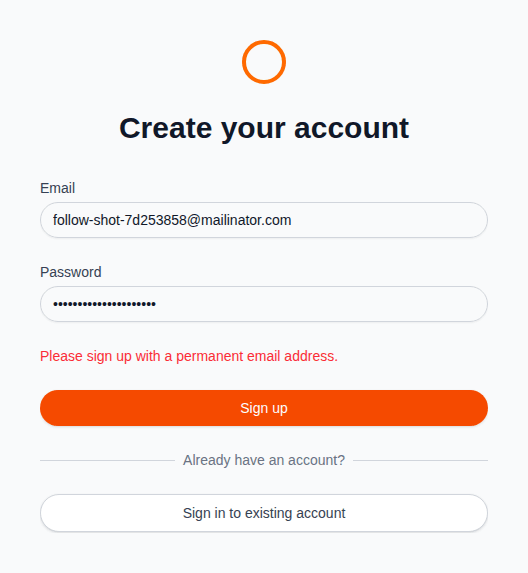
The message is DEFAULT_BLOCK_MESSAGE, "Please sign up with a permanent email address." To show other words, return
your own string in its place. The block message on the dashboard's Rules tab applies to the Supabase hook only.
checkSignup never throws. A timeout after 1.5 seconds, a network error, an error status or an incomplete answer each
return action: "allow". Each one also calls onError, which logs a fixed reason such as signupbouncer: timeout.
Your app refuses a signup only on a complete answer. If signupbouncer is slow or down, the signup goes through, and an outage on our side delays it by 1.5 seconds at most. In our test run with the signupbouncer API stopped, a signup reached the dashboard in about a tenth of a second.
The client IP
On your machine, the check sends the email alone. In production, set SIGNUPBOUNCER_IP_HEADER to the header your host
overwrites with the client's IP.
On Vercel that's x-real-ip, so add SIGNUPBOUNCER_IP_HEADER=x-real-ip next to SIGNUPBOUNCER_API_KEY in the
project's environment variables. The comment above clientIp() in lib/signupbouncer.ts lists the header for
Cloudflare and Fly.io.
clientIp() reads only the header you name. A client can send X-Forwarded-For or X-Real-IP itself. Unless your
host replaces that header, its value is whatever the client wrote.
From the Starter plan, we add points for datacenter, VPN and Tor addresses. A VPN or Tor address on its own never
reaches a block. On the Free plan the IP checks still run, and the answer's shadow field lists what a paid plan would
add, without changing the score.
Shadow mode first, then enforce
Every signupbouncer app starts in shadow mode. We check and log each signup, and action is always "allow". So
shouldBlock returns false and every signup gets an account.
Sign up a few times through your form, once with an address at mailinator.com. Test signups count toward your monthly checks.
Open the Checks tab on your dashboard. The mailinator.com signup shows as block, and its account exists all the same.
When the results look right, open your app's Rules tab. Choose Enforce under Mode, then choose Save settings. From then on, your form refuses any signup marked block.
One account per address, whatever its case
The upstream starter stores an email as typed, so Test@test.com and test@test.com become two accounts
(nextjs/saas-starter#184). To fix it, add .trim().toLowerCase()
after z.string() in each schema in app/(login)/actions.ts that reads an email. signInSchema then reads:
const signInSchema = z.object({
  email: z.string().trim().toLowerCase().email().min(3).max(255),
  password: z.string().min(8).max(100)
});
signUpSchema gets the same change:
const signUpSchema = z.object({
  // One account per address, whatever its case (nextjs/saas-starter#184).
  email: z.string().trim().toLowerCase().email(),
  password: z.string().min(8),
  inviteId: z.string().optional()
});
The account settings form uses updateAccountSchema, which gets it too:
const updateAccountSchema = z.object({
  name: z.string().min(1, 'Name is required').max(100),
  email: z.string().trim().toLowerCase().email('Invalid email address')
});
The team invite form uses inviteTeamMemberSchema, which gets it as well:
const inviteTeamMemberSchema = z.object({
  email: z.string().trim().toLowerCase().email('Invalid email address'),
  role: z.enum(['member', 'owner'])
});
Invitations sent before this change can still hold capitals. In signUp, change the lookup that matches an invite
link to its invitation, so it compares the stored address in lower case.
sql is already imported from drizzle-orm at the top of the file. The lookup then reads:
    const [invitation] = await db
      .select()
      .from(invitations)
      .where(
        and(
          eq(invitations.id, parseInt(inviteId)),
          // Invitations sent before the lowercase change can hold capitals.
          eq(sql`lower(${invitations.email})`, email),
          eq(invitations.status, 'pending')
        )
      )
      .limit(1);
An invitation sent to Ann@gmail.com then matches the account that signs up as ann@gmail.com. Upstream's signUp
creates the user before it looks up the invitation. So a signup through an expired invite link still leaves an account
with no team.
The change applies to new input. If your database already holds mixed-case emails, lowercase them once. The email
column of users is unique, so first look for accounts that differ only by case, and merge or rename them.
Then lowercase the users and the invitations together:
select lower(email), count(*) from users group by 1 having count(*) > 1;
update users set email = lower(email) where email <> lower(email);
update invitations set email = lower(email) where email <> lower(email);
Repeat signups from one inbox
Gmail delivers a.b@gmail.com, ab+1@gmail.com and a.b+2@gmail.com to one inbox, because it drops the dots and
anything after a +. On every plan, we fold those spellings into one inbox. Then we count that inbox's signups to your
account in the last 7 days.
Each repeat adds points to the signup: 25 for the second, 40 for the third, 55 for the fourth, 70 for the fifth and 75 from the sixth on. One repeat stays below the challenge cutoff, because people do sign up again after losing a password.
At the default cutoffs, a score of 40 makes a challenge and 70 makes a block. The third and fourth signups are
challenges. shouldBlock(check) returns false for a challenge, so they get accounts.
The fifth is refused. Our test run gave the same result, with four accounts from one inbox and a refusal for the fifth spelling. The count spans every app on your signupbouncer account.
To refuse from the third signup, change the condition to shouldBlock(check, 'block'). A challenge is any score
between the two cutoffs. So this also refuses other borderline signups, such as an address on a free subdomain,
ann@foo.duckdns.org (45 points).
On the Pro plan, velocity rules add points for bursts of signups from one network, or from one inbox in several spellings. Velocity points can lift a signup to a challenge, never to a block. So they lead to a refusal only when you refuse challenges.
What it doesn't stop
A person with several real inboxes at different providers, say a Gmail and an Outlook address, gets an account with each. We can't link two unrelated inboxes to one person, so each address starts its own repeat count.
We still score each of those signups on its own address and network. From the Starter plan, a signup from a datacenter, VPN or Tor address gets points for it, whichever inbox it uses.
The check doesn't prove that the person owns the address. For that, add email verification to the starter.
On the Free plan, signups past 1,000 checks in a month go through unchecked until the month ends.
Run the finished code
git clone https://github.com/signupbouncer/nextjs-saas-starter-signup-protection
cd nextjs-saas-starter-signup-protection
pnpm install
cp .env.example .env
Fill in .env as in the first section, with your signupbouncer key. Then run:
pnpm db:migrate
pnpm dev
Open http://localhost:3000/sign-up and sign up with an address at mailinator.com. With your app in enforce mode, the
form shows "Please sign up with a permanent email address." and the starter creates no account.
The starter's own README is in the repo as README.upstream.md. It has the Stripe setup and the steps for production.
Where to go next
- signupbouncer/nextjs-saas-starter-signup-protection has the finished code, with its tests.
- The REST API reference lists every field in the answer, and the errors.
- The reason codes table shows what each reason means and how the points add up.
- Shadow and enforce shows what each mode does with a check's result.