A wave of bot signups on your Supabase app uses up Supabase's hourly limit on confirmation emails, and then real people can't sign up. This guide adds SignupBouncer's Before User Created hook. It refuses burner signups before Supabase creates the user, so they never get a confirmation email.
- Clone our copy of the Next.js and Supabase starter and install its packages.
- Sign up for SignupBouncer and copy your hook URL and hook secret into
supabase/.env. - Start Supabase and the app, and sign up with your own address.
- Send a small bot wave in shadow mode and watch it reach the limit of Supabase's built-in email sender, 2 emails an hour.
- Turn on blocking and send the wave again.
- Deploy to hosted Supabase with your own email provider. Switch your app back to shadow mode for a week, then resume blocking.
Someone on r/Supabase asked about this before launching their app: "If a sudden wave of fake accounts pushes usage over the quota, what actually happens in practice?" A reply answered in a line: "sudden bot signups mostly just burn your otp/email quota and logins start failing before billing surprises you."
The finished code is in signupbouncer/nextjs-supabase-signup-protection. It's the with-supabase example from the Next.js repo, under its MIT license. We added the hook to its local Supabase config.
What a bot wave does to a Supabase project
Email usually comes first. Hosted projects have email confirmation on by default, so each email and password signup sends an email. Supabase's built-in email sender sends 2 an hour, and only to addresses on your project's team. Once you add your own SMTP provider, Supabase sets the limit to 30 an hour, and you can raise it (custom SMTP, rate limits).
When a project reaches its email limit, Supabase answers every signup that needs an email with "email rate limit exceeded", real people included, for up to an hour. In our test run, a burner signup and a real one used up the limit of 2 an hour.
Monthly active users come later. Supabase counts a user when they sign in or refresh a token in the billing cycle, so a fake account counts once someone opens the confirmation link in its burner inbox, which signs it in. On Supabase's Free plan you get 50,000 a month across your organization, and 500 MB of database per project (billing, monthly active users).
Over a quota, Supabase restricts your projects. On Supabase's Free plan you usually get an email and a grace period first, and if you stay over, Supabase may pause projects, make databases read-only or answer every API request with status 402 (Fair Use Policy). Those restrictions generally apply to every project in the organization.
The Fair Use Policy also says Supabase can restrict a project without notice when it suspects abuse. Once a grace period ends, you don't get another one if you go over again. On Supabase's Free plan, though, you're never charged for going over.
On Supabase's Pro plan the same restrictions apply while the spend cap is on, and with it off you pay $0.00325 for each monthly active user over 100,000 (cost control).
Supabase's SMTP guide describes this attack, where bots sign up in bulk to damage your sending reputation, block real signups, or push you into turning off email confirmation.
Get the code
You need Node 22.18 or later, Docker (or another container runtime the Supabase CLI supports) and the Supabase CLI. Supabase's CLI guide lists the ways to install it:
- macOS and Linux, with Homebrew:
brew install supabase/tap/supabase - Windows, with Scoop:
scoop bucket add supabase https://github.com/supabase/scoop-bucket.git, thenscoop install supabase - Any system, inside the project:
npm install supabase --save-dev, then typenpx supabasewherever this guide sayssupabase
Clone the repo and install its packages:
git clone https://github.com/signupbouncer/nextjs-supabase-signup-protection
cd nextjs-supabase-signup-protection
npm install
Connect SignupBouncer
Sign up for SignupBouncer. On our Free plan you get 1,000 checks a month, with no card.
Your account starts with an app, so open its Integration tab and copy the hook URL and the hook secret. The hook doesn't need an API key.
For local Supabase, copy supabase/.env.example to supabase/.env and paste the hook URL and the hook secret into it.
supabase start reads them from that file and stops with a config error while either is missing.
# Local Supabase only: `supabase start` reads this file (copy it to supabase/.env) and fills the
# [auth.hook.before_user_created] block in config.toml. On hosted Supabase you paste the same two values in the
# dashboard instead: Authentication > Hooks > Before User Created > HTTPS.
SIGNUPBOUNCER_HOOK_URL=https://signupbouncer.com/hook/supabase/app_...
SIGNUPBOUNCER_HOOK_SECRET=v1,whsec_...
supabase/.env is in .gitignore, so the secret stays out of your commits.
Every SignupBouncer app starts in shadow mode. That means we check and log each signup but refuse none of them. When the checks look right, you turn on blocking.
Start it
Start Supabase:
supabase start
The CLI publishes the local database (port 54322), API (port 54321) and Mailpit (port 54324) on every network
interface. So on a shared or public network, block those ports in your firewall, and run supabase stop when you're
done.
Copy the app's env file:
cp .env.example .env.local
Run supabase status and copy its project URL and publishable key into .env.local:
- Project URL,
http://127.0.0.1:54321, goes inNEXT_PUBLIC_SUPABASE_URL. - The key labeled Publishable, which starts with
sb_publishable_, goes inNEXT_PUBLIC_SUPABASE_PUBLISHABLE_KEY.
Then start the app:
npm run dev
Open http://localhost:3000/auth/sign-up and create an account with your own address. The starter shows "Thank you
for signing up!" and Supabase sends a confirmation email.
Local Supabase delivers that email to Mailpit, so open http://localhost:54324, open the email and choose "Confirm
email address". The starter signs you in and shows its protected page.
The repo's supabase/config.toml sends that email through Mailpit's SMTP port, so the hourly email limit applies as
it does on a hosted project:
# Number of emails that can be sent per hour. Requires auth.email.smtp to be enabled.
# 2 is the limit of Supabase's built-in email sender on hosted projects.
email_sent = 2
So your signup used the first of the 2 emails Supabase sends in an hour.
How the hook refuses a signup
The CLI fills in this block of supabase/config.toml from supabase/.env:
# signupbouncer checks every new signup before Supabase creates the user.
# Copy the hook URL and secret from the signupbouncer dashboard (Integration tab) into supabase/.env.
[auth.hook.before_user_created]
enabled = true
uri = "env(SIGNUPBOUNCER_HOOK_URL)"
secrets = "env(SIGNUPBOUNCER_HOOK_SECRET)"
Supabase sends every new signup to the hook before it creates the user. To refuse one, we answer with HTTP 200 and an error object that carries your block message. Supabase Auth then returns that message to your app as a sign-up error with status 400, without creating the user or sending an email.
The starter's sign-up form in components/sign-up-form.tsx already shows the error message Supabase returns:
    try {
      const { error } = await supabase.auth.signUp({
        email,
        password,
        options: {
          emailRedirectTo: `${window.location.origin}/protected`,
        },
      });
      if (error) throw error;
      router.push("/auth/sign-up-success");
    } catch (error: unknown) {
      setError(error instanceof Error ? error.message : "An error occurred");
    } finally {
      setIsLoading(false);
    }
Supabase's page on this hook says to refuse a signup with a 4xx status, but a hook that does that gives the user "Invalid payload sent to hook" instead of your message (supabase/auth#2235). That's because Supabase Auth reads a hook's error object only from a 200 or 202 answer. In our test against Supabase Auth v2.197.0, a hook that answered 400 gave the user a 500 with that generic text, while our 200 answer gave the user our message.
Send a bot wave in shadow mode
The repo has a script that signs up the way a bot does: five burner addresses, then a fresh Gmail address that stands
in for a real person. It reads your .env.local and won't run against a Supabase on another machine.
const tag = Math.random().toString(36).slice(2, 8);
const burners = ["mailinator.com", "sharklasers.com", "yopmail.com", "guerrillamail.com", "maildrop.cc"];
const signups = [...burners.map((domain, i) => `wave${i + 1}-${tag}@${domain}`), `real.person.${tag}@gmail.com`];

const supabase = createClient(url, key, { auth: { persistSession: false } });
for (const email of signups) {
  const { data, error } = await supabase.auth.signUp({ email, password: `wave password ${tag}` });
  if (error) {
    console.log(`${email.padEnd(34)} failed: ${error.message} (HTTP ${error.status})`);
  } else {
    const emailed = data.user?.confirmation_sent_at ? ", confirmation email sent" : "";
    console.log(`${email.padEnd(34)} account created${emailed}`);
  }
}
Run it while your app is still in shadow mode:
npm run bot-wave
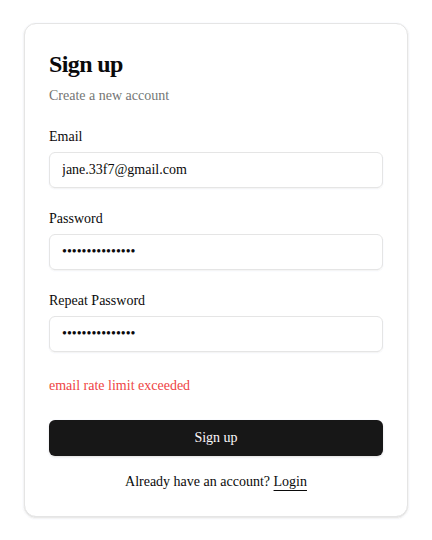
In our run, the first burner signup used the second of the 2 emails, so every signup after it failed, the real person's too:
wave1-83vyx1@mailinator.com        account created, confirmation email sent
wave2-83vyx1@sharklasers.com       failed: email rate limit exceeded (HTTP 429)
wave3-83vyx1@yopmail.com           failed: email rate limit exceeded (HTTP 429)
wave4-83vyx1@guerrillamail.com     failed: email rate limit exceeded (HTTP 429)
wave5-83vyx1@maildrop.cc           failed: email rate limit exceeded (HTTP 429)
real.person.83vyx1@gmail.com       failed: email rate limit exceeded (HTTP 429)
Sign up on the form with another real address, and the starter shows the same error.
Open the Checks tab on your SignupBouncer dashboard to see each of the five burner signups marked block, with the reason Burner domain. But in shadow mode we let all five through, and Supabase's email limit stopped four of them.
On a hosted project with your own SMTP provider, a bot wave needs more signups to reach the limit. At 30 emails an hour, 30 burner signups use them all, and your provider sends each email to a throwaway inbox.
Turn on blocking and send the wave again
Open your app's Rules tab. Choose Enforce next to Mode, then Turn on blocking in the window that opens.
Then restart Supabase so it counts emails from zero again. Your users and data stay.
supabase stop
supabase start
Send the wave again:
npm run bot-wave
This time we refuse every burner before Supabase creates the user, so none of them gets an email. The real person gets an account and the confirmation email.
wave1-hjogcb@mailinator.com        failed: Please sign up with a permanent email address. (HTTP 400)
wave2-hjogcb@sharklasers.com       failed: Please sign up with a permanent email address. (HTTP 400)
wave3-hjogcb@yopmail.com           failed: Please sign up with a permanent email address. (HTTP 400)
wave4-hjogcb@guerrillamail.com     failed: Please sign up with a permanent email address. (HTTP 400)
wave5-hjogcb@maildrop.cc           failed: Please sign up with a permanent email address. (HTTP 400)
real.person.hjogcb@gmail.com       account created, confirmation email sent
Try a burner address on the form, and it shows "Please sign up with a permanent email address." Mailpit gets no email, and Supabase has no new user.
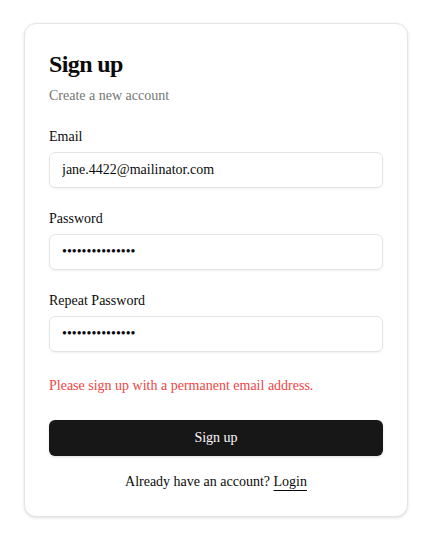
To show your own words, write up to 200 characters in the Block message on the Rules tab, then choose Save blocking rules.
On every plan, we refuse burner domains, domains whose mail goes to a known burner mail server, and domains that
can't receive mail. We also treat Gmail addresses that differ only by dots or a +tag as the same inbox and count
that inbox's signups over 7 days, so at the default settings we refuse its fifth signup in 7 days.
In production, keep your app in shadow mode for about a week and watch the Checks tab for real customers marked block, then turn on blocking.
Captcha and email_guard
The replies in the r/Supabase thread suggested captcha, and there's also the email_guard extension, which refuses disposable addresses inside your own database.
Captcha. Supabase Auth supports hCaptcha and Cloudflare Turnstile on sign-up, sign-in and password reset (Supabase captcha guide). Supabase's SMTP guide calls captcha "the most effective way to control bots" in this attack. A captcha stops scripts that can't solve the challenge, but it doesn't look at the address, so a person who types a mailinator.com address passes it.
Captcha and the hook are separate Supabase settings, so you can turn on both.
email_guard is a free Postgres extension that you install as a Before User Created hook of the Postgres type (database.dev). Supabase's DEV account has a post on setting up email_guard. email_guard refuses domains on a public disposable-email list and any Gmail address whose inbox already has an account. A new version with the refreshed list comes out each week, and you get it by upgrading the extension.
A Supabase project has a single Before User Created hook, so you choose email_guard or SignupBouncer. email_guard runs in your own database, which means no outside call and no monthly limit. Its Gmail rule allows a single account per inbox for as long as that account exists.
SignupBouncer also refuses domains whose mail goes to a burner mail server and domains that can't receive mail, and you get shadow mode and a dashboard that lists every check. From our Starter plan up, we score datacenter, VPN and Tor IP addresses too. Our Gmail rule counts repeats over 7 days instead, so the same person can sign up again after a while.
What the check doesn't catch
- We don't cap your Supabase usage or your bill. Supabase's rate limits slow down particular Auth operations, and on Supabase's Pro plan the spend cap holds the usage items it covers at the quota.
- A script that signs up with real people's addresses, taken from a leaked list, gets through our check, because each address is real. Supabase's docs describe this attack and recommend captcha against it.
- When someone signs up through Google, we check only the IP address and signup bursts, since Google has verified the address. IP checks count from our Starter plan and bursts from our Pro plan, so on our Free plan we log a new Google account and let it through. The hook runs only when Supabase creates a user, so we don't check returning sign-ins. This repo sets up email and password signups only.
- We don't detect signups through residential proxies, the home IP addresses that proxy sellers rent out, because those signups look like ordinary visitors.
- A refused signup is still a request to Supabase Auth, so it counts toward Auth's limit of 30 signups per 5 minutes from the same IP address.
- The check doesn't prove that the person owns the address, but Supabase's email confirmation does.
- On our Free plan, signups past 1,000 checks in a month go through unchecked until the month ends.
- If our server is slow or down, the signup goes through unchecked. We answer allow when a check takes longer than 1.2 seconds, and the Cloudflare Worker in front of the hook URL answers allow when our server takes longer than 1.5 seconds, sends an error or can't be reached.
- When Cloudflare has an incident, or the Worker goes over one of Cloudflare's limits, the hook call fails and Supabase answers every signup with an error. To let people sign up again, switch the hook off under Authentication, then Auth Hooks, and signups go through unchecked until you switch it back on.
Deploy it
Create a project on Supabase. This repo has no database migrations, so there's nothing to push.
In the project's dashboard:
-
Open Authentication, then Auth Hooks, and choose Add hook. Pick Before User Created, and choose HTTPS as the hook type.
-
Paste your hook URL into the URL field and your hook secret into the Secret field, then save. Supabase signs each call with that secret, and we check the signature.
If you chose Generate secret, open Secret options on the Integration tab and choose Use Supabase's secret. Paste Supabase's secret into Secret from Supabase, then choose Use this secret, and we stop accepting the old secret 24 hours later. Paste Supabase's secret into
supabase/.env, then runsupabase stopandsupabase startto reload it. -
Add your own SMTP provider (Supabase's guide), because the built-in sender only delivers to your team's addresses.
-
Under Authentication, then Emails, paste the two templates from
supabase/templates/into the confirmation and password reset templates, so their links reach the starter's/auth/confirmroute. -
Under Authentication, then URL Configuration, set the Site URL to your app's address, and add
https://<your-app>/**to the redirect URLs.
Deploy the app to Vercel or any host that runs Next.js, with NEXT_PUBLIC_SUPABASE_URL and
NEXT_PUBLIC_SUPABASE_PUBLISHABLE_KEY from your project's API settings. supabase/.env is for local Supabase only.
Your SignupBouncer app is still in Enforce from the second wave, so before real people sign up, choose Shadow next to Mode on the Rules tab, then Switch to Shadow. Watch a week of real signups on the Checks tab, then turn on blocking again.
Where to go next
- signupbouncer/nextjs-supabase-signup-protection has the finished code and its tests.
- Install in Supabase covers what happens when the hook fails, and which signups the hook sees.
- The reason codes table shows what each reason means and how the points add up.
- Shadow and enforce shows what each mode does with a check's result.
- Pricing lists what you get on our Starter plan and our Pro plan.